How to accept the deal terms from a brand
Ажурирано: 24. новембар 2026.
Овај чланак још није преведен на ваш језик — приказује се на енглеском.
На овој страници
The brand sets the terms, and you accept or decline them: open "Campaigns", find the "Deal terms" block on the campaign card and click "Accept" or "Decline". Once the money arrives, click "I got the money" in the same block.
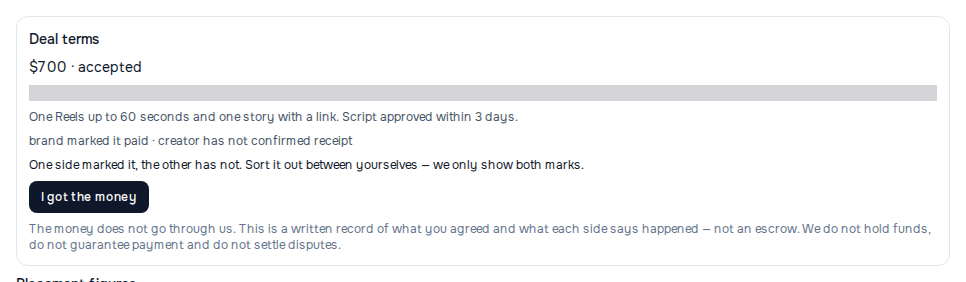
The block appears once the brand has picked you — status "Selected". Until the brand writes anything down, it says "The brand has not set terms yet."
What the terms contain
- Amount and state — after the amount, separated by a dot, comes one of the states: "proposed", "accepted" or "declined".
- Dates — "publish by: …" and "pay by: …", if the brand set them.
- What the placement includes — the brand's own text: how many posts, where, in what form.
- "Usage rights: …" — the same line the campaign card showed before you applied. The brand cannot change it.
Accept or decline
- Open "Campaigns" and find the campaign with the "Selected" status.
- Read the "Deal terms".
- Click "Accept" — the amount will show "accepted". Or "Decline" — it will show "declined".
If you declined, the brand can propose new terms: the amount will show "proposed" again and the buttons come back. You cannot propose your own terms in this block — only the brand fills it in.
The "publish by" date of the accepted terms becomes your placement deadline, and we will remind you of it by email, see placement deadline and reminders.
Mark that the money arrived
After acceptance, the marks of both sides appear under the amount, for example "brand marked it paid · creator has not confirmed receipt".
- When the money reaches you, click "I got the money".
- Your mark will change to "creator confirmed receipt".
When both sides have marked it, you will see "Both sides marked the payment.". If only one side has, you will see "One side marked it, the other has not. Sort it out between yourselves — we only show both marks."
Each side sets its own mark: the brand clicks "I have paid", you click "I got the money". You cannot mark it for the brand, and the brand cannot mark it for you. A mark cannot be removed, so click "I got the money" only once the money is really with you.
The money does not go through WŬMÙ
The terms always carry this line: "The money does not go through us. This is a written record of what you agreed and what each side says happened — not an escrow. We do not hold funds, do not guarantee payment and do not settle disputes."
This means:
- the transfer, the invoice, the paperwork and the taxes are between you and the brand;
- we do not hold the amount until publication and do not refund it if something goes wrong;
- if the brand does not pay, we only show who marked what — the dispute is for you and the brand to settle.
The deal is handled by whoever applied to the campaign — or by the page owner, if it was an invitation. No email is sent when the brand sets new terms: check the block under "Campaigns".
If something went wrong
- "The brand has not set terms yet." — the brand has not written down the amount and dates yet. Check back later.
- "Accepted terms cannot be changed" — the terms are already accepted, for example in another tab. Reload the page.
- "Could not save" — try again in a minute. You cannot accept terms while the page is blocked by the administration; you can still decline them, see the page does not open or is blocked.
- No placement deadline after "Accept" — reload the page: the "Placement deadline: …" line appears on the card after a reload.
- You are a member of the page, the block says "The brand has not set terms yet." but the brand has set them — only the person who applied to the campaign sees the terms, or the page owner if it was an invitation.
Да ли вам је чланак помогао?
Нисте пронашли одговор?
Наш тим за подршку ће вам помоћи — пишите нам у ћаскању.